How Long Does a Laptop Battery Last?
Battery capacity sets the ceiling on how long a laptop runs unplugged. Every capacity below is a figure a maker prints for a shipping machine, and every column is a draw backed out of that maker's own published battery life (the arithmetic is in the next section):
| Battery Size | 4W (light, maker-test class) | 9W (1080p video on a gaming laptop) | 17W (office benchmark on a gaming laptop) |
|---|---|---|---|
| 57 Wh (ThinkPad X1 Carbon Gen 11) | 14.3 hours | 6.3 hours | 3.4 hours |
| 70 Wh (Zenbook A14) | 17.5 hours | 7.8 hours | 4.1 hours |
| 72.4 Wh (MacBook Pro 14-inch) | 18.1 hours | 8 hours | 4.3 hours |
| 80 Wh (Legion Pro 5 16IAX10) | 20 hours | 8.9 hours | 4.7 hours |
| 99.6 Wh (MacBook Pro 16-inch) | 24.9 hours | 11.1 hours | 5.9 hours |
Runtimes assume a battery still holding 100% of its original capacity, so each cell is a plain division with nothing hidden in it. Apple prints that a MacBook battery is designed to keep up to 80% of its original capacity at 1000 complete charge cycles; at 80% health every figure above drops by 20%. Batteries above 100 Wh need airline approval to fly and nothing over 160 Wh is allowed in the cabin, which is why no laptop pack in the table goes higher. For external packs that extend these times, see how long a power bank lasts.
How Many Watts Does a Laptop Use?
No maker publishes a wattage. They publish a battery size, a number of hours and the test they ran, and the draw falls out of the division. Each row below is one printed triple with its arithmetic:
| Laptop | Battery | What the maker prints | Implied average draw |
|---|---|---|---|
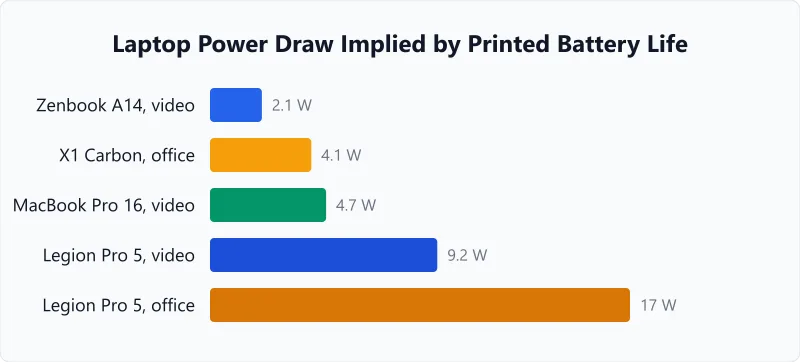
| ASUS Zenbook A14 (UX3407NA) | 70 Wh | over 33 hours, 1080p video playback | 70 ÷ 33 = 2.1 W |
| Apple MacBook Pro 14-inch | 72.4 Wh | 24 hours video streaming | 72.4 ÷ 24 = 3 W |
| Lenovo ThinkPad X1 Carbon Gen 11 | 57 Wh | 13.95 hours, MobileMark 25 at 250 nits | 57 ÷ 13.95 = 4.1 W |
| Apple MacBook Pro 14-inch | 72.4 Wh | 16 hours wireless web | 72.4 ÷ 16 = 4.5 W |
| Apple MacBook Pro 16-inch | 99.6 Wh | 21 hours video streaming | 99.6 ÷ 21 = 4.7 W |
| Apple MacBook Pro 16-inch | 99.6 Wh | 14 hours wireless web | 99.6 ÷ 14 = 7.1 W |
| Lenovo Legion Pro 5 16IAX10 | 80 Wh | 8.7 hours, local 1080p video at 150 nits | 80 ÷ 8.7 = 9.2 W |
| Lenovo Legion Pro 5 16IAX10 | 80 Wh | 4.7 hours, MobileMark 30 at 250 nits | 80 ÷ 4.7 = 17 W |
Two things fall out of that spread. The same 80 Wh gaming laptop implies 9.2 W playing video and 17 W running an office suite, so the machine matters less than the task. And nobody prints a figure for gaming under load, a video call or a compile, which is why this page gives you none: those draws are real but unpublished, so measure your own instead. The next section shows how, and it takes about a minute on either platform.
How to Find Your Laptop's Battery Specs
- Windows: Open a Command Prompt and type
powercfg /batteryreport. The generated HTML report shows your battery's design capacity in mWh. Divide by 1,000 to get Wh. It also shows current full charge capacity vs original — a measure of battery health. - Mac: Hold Option and click the Apple menu, then choose System Information. Under Power, find "Full Charge Capacity (mAh)" and voltage. Multiply mAh by voltage and divide by 1,000 for Wh. Or check Apple's spec page for your model's Wh rating.
- Check real-time power draw: On Windows, install HWMonitor or check Task Manager's "Power Usage" column. On Mac, Activity Monitor shows energy impact per app. These tools reveal which apps drain your battery fastest, and a few minutes of watching the figure while you work gives you the number to type above.
Worked Examples
Reproducing Lenovo's Printed 13.95-Hour Claim
Context
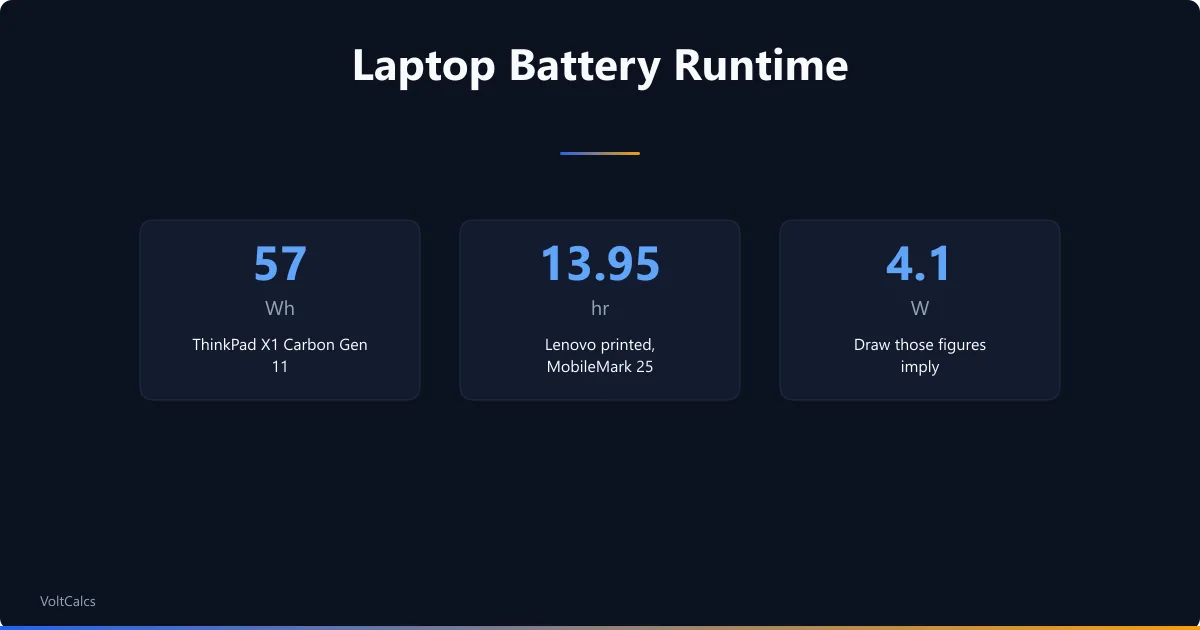
Lenovo's spec sheet for the ThinkPad X1 Carbon Gen 11 prints two numbers: a 57Wh battery and up to 13.95 hours on the MobileMark 25 benchmark at 250 nits. Neither number is a wattage, so the draw has to be worked out from the pair.
Calculation
Implied draw: 57 Wh ÷ 13.95 hr = 4.09 W, so enter 4.1 W.
Runtime: 57 Wh ÷ 4.1 W = 13.90 hours.
Interpretation
13.9 hours against Lenovo's printed 13.95, a gap of about a third of a percent that comes entirely from rounding 4.09 to 4.1. The division is doing exactly what the maker's own figures say it should. Feed it a draw that matches your work rather than an office benchmark and the same division gives your answer.
Takeaway
Any published battery-life claim can be turned into a wattage this way, which makes it comparable with your own measurement. For packs quoted in amp-hours instead of watt-hours, our battery capacity calculator converts between the two.
What a Gaming Laptop Gives You Unplugged
Context
The Legion Pro 5 16IAX10 carries an 80Wh battery. Lenovo prints 4.7 hours for it on the MobileMark 30 office benchmark at 250 nits, and 8.7 hours playing local 1080p video at 150 nits. Same machine, same pack, two very different answers.
Calculation
Implied draw: 80 Wh ÷ 4.7 hr = 17.0 W.
Runtime: 80 Wh ÷ 17 W = 4.71 hours.
Same battery, Lenovo's video test: 80 ÷ 8.7 = 9.2 W, and 80 ÷ 9.2 = 8.7 hours.
Interpretation
The office workload costs 17W and the video workload 9.2W, so the same battery runs 4.7 hours or 8.7 hours depending on what you ask of it. Actual gaming draws more than either, but no maker prints a gaming figure, so this page will not invent one. What the pair does show is how far a workload alone can move the answer.
Takeaway
If you need a real number for a heavy task, measure it rather than borrow it. To model a separate power station or battery bank instead, enter its specs into our battery runtime calculator.
Frequently Asked Questions
Glossary
Watt-Hour Capacity
The total energy stored in a laptop battery. A 57Wh battery can deliver 57 watts for one hour, or 14.25 watts for four hours. Larger capacities mean longer runtime at the same power draw.
Battery Health
A percentage showing how much of the original battery capacity remains after charge cycles. At 80% health, a 57Wh battery effectively holds 45.6Wh. Most laptops show battery health in system settings or diagnostics.
Implied Power Draw
The average watts behind a maker's printed battery life, found by dividing the battery's watt-hours by the hours the maker publishes. Lenovo's 57Wh ThinkPad X1 Carbon Gen 11 at 13.95 hours implies 4.1W; the 80Wh Legion Pro 5 at 4.7 hours on an office benchmark implies 17W. It is the one wattage figure on this page that comes from a published number rather than a guess.
Calculate what your laptop costs to run per month with the kWh calculator.
Related calculators
Portable Power Bank Runtime Calculator
Find how long your portable power bank charges your phone, tablet, or laptop. Enter mAh, voltage, and device wattage.
Battery
UPS Battery Backup Time Calculator
Work out how long your UPS runs on battery from the string inside it, the load you plug in, and the battery class it uses.
Battery
Watt Hours to Amp Hours Calculator
Convert watt-hours to amp-hours at any voltage. Use this to compare batteries rated in different units.
Battery
CPAP Battery Runtime Calculator
Calculate how many nights your battery powers a CPAP machine. Enter battery capacity, voltage, and CPAP wattage for instant runtime results.
Battery
The number this page gives you is only as good as the wattage you feed it, and that is the figure worth spending five minutes on. Take a battery report, watch the draw while you do your normal work, then come back and enter it. Need to convert your laptop's mWh rating to standard Wh or Ah? Our Wh to Ah converter handles the math. If you are building a portable power station from individual cells, the battery pack calculator sizes the configuration.
More Battery calculators
Browse all battery calculators — LiFePO4, lead-acid, AGM, and lithium-ion runtime, charge time, and capacity sizing.
Last updated:
Written and maintained by Dan Dadovic, Commercial Director at Ezoic Inc. & PhD Candidate in Information Sciences. He works professionally as Commercial Director at Ezoic Inc., leading revenue strategy across digital publishing.
Disclaimer: Calculator results are estimates based on theoretical formulas. Actual performance varies with temperature, battery age, load patterns, and equipment condition. For critical electrical work, consult a licensed electrician.
Methodology reviewed by Doc. dr. sc. Damir Topić, Assistant Professor, FERIT Osijek.