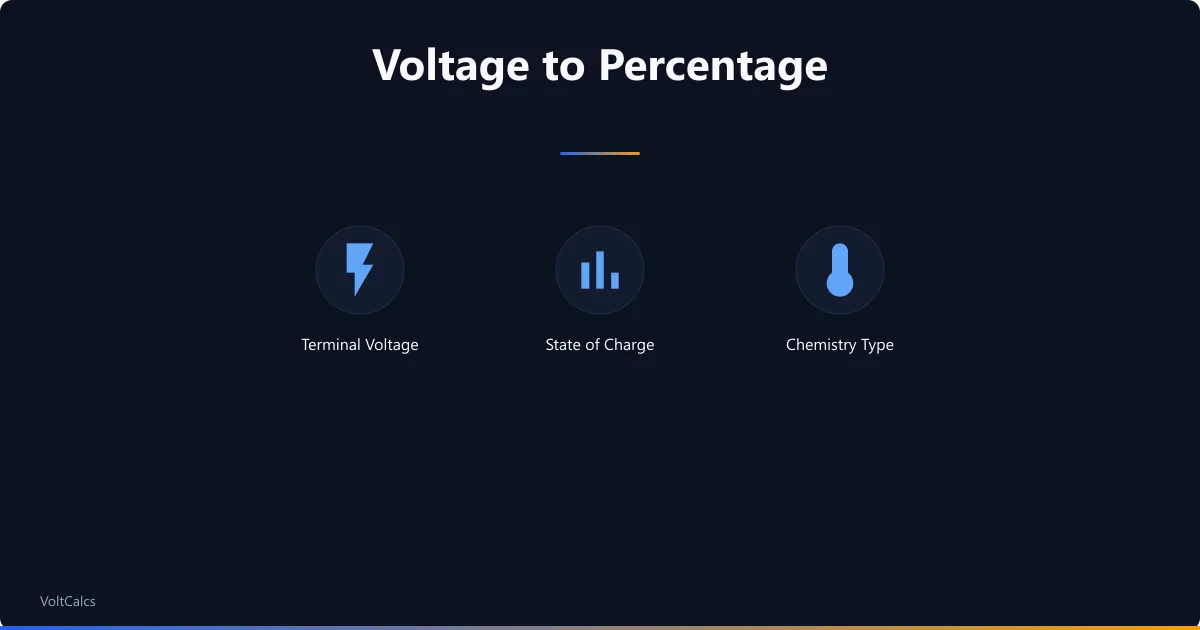
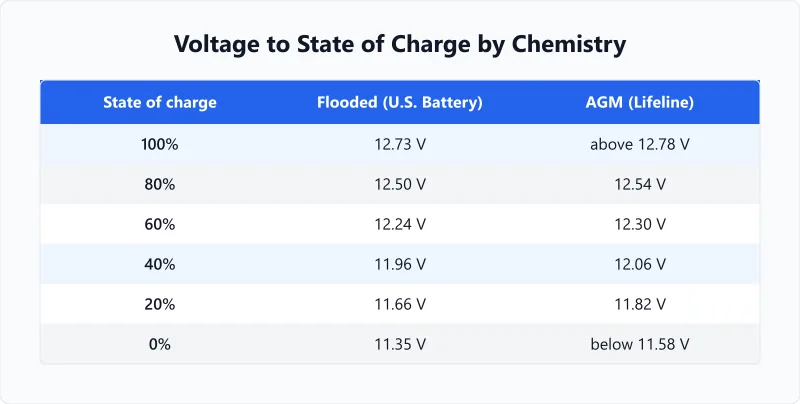
12V Battery State of Charge by Chemistry
| State of charge | Flooded lead-acid (12V) | AGM (12V) |
|---|---|---|
| 100% | 12.73V | above 12.78V |
| 90% | 12.62V | 12.66V |
| 80% | 12.50V | 12.54V |
| 70% | 12.37V | 12.42V |
| 60% | 12.24V | 12.30V |
| 50% | 12.10V | 12.18V |
| 40% | 11.96V | 12.06V |
| 30% | 11.81V | 11.94V |
| 20% | 11.66V | 11.82V |
| 10% | 11.51V | 11.70V |
| 0% | 11.35V | below 11.58V |
The flooded column is the 12V column of the open-circuit voltage table in U.S. Battery's user manual. Trojan prints the same column, row for row, in its battery maintenance guide; the two differ at only two rows, by 0.03V at 60% and 0.07V at 40%. The AGM column is the 12V column of Concorde's Lifeline technical manual.
Notice the two open rows in the AGM column. Lifeline prints its top row as "greater than 12.78V" and its bottom row as "less than 11.58V" rather than as fixed numbers, so this calculator reports anything above 12.78V as 100% and anything below 11.58V as 0%. The flooded column has closed ends, so readings outside 12.73V and 11.35V sit off the printed table and the calculator warns you instead of quietly extending it.
One caution on the AGM figures. U.S. Battery publishes its own AGM table that runs 0.16V to 0.24V above Lifeline's at every row: where Lifeline puts 100% at 12.78V, U.S. Battery puts it at 13.00V, and where Lifeline puts 40% at 12.06V, U.S. Battery reads that same voltage as 25%. Lifeline prints the reconciliation itself, saying its levels apply to aged batteries and that a new battery reads higher, about 13.0V at full charge. So the calculator answers an AGM reading on Lifeline's table and shows U.S. Battery's answer beside it. A new AGM battery reading 12.90V is not broken and it is not overcharged, it is simply young. Sizing a bank around those numbers is a separate job, and our AGM runtime calculator handles it.
For a 24V bank, divide your reading by two before looking it up; for 48V, divide by four. The calculator does this for you when you set the system voltage, which is why 24.48V on a 24V bank reads 60% rather than falling off the top of the table.
Why This Calculator Will Not Give a LiFePO4 Percentage
Pick LiFePO4 in the chemistry selector and this page returns no percentage. That is deliberate, and it is the honest answer rather than a gap.
| Manufacturer | What it publishes for a rested 12V LiFePO4 battery |
|---|---|
| LiTime | 100%: 13.33V or above · 75%: 13.3-13.33V · 50%: 13.15-13.2V · 25%: 13-13.15V · 0%: 10-12V |
| Mach 1 Lithium | 100%: 13.4-13.6V · about 90%: 13.3-13.4V · about 70%: 13.1-13.2V · about 50%: 13.0-13.1V · about 20%: 12.8-12.9V |
| Victron Energy | No table. Its Lithium Smart manual states that "state of charge monitoring is not built into the battery" and points the owner to a Lynx Smart BMS, a BMV or a SmartShunt. |
| RELiON | No table. Its support pages answer the question with "the best way to determine the SOC of your battery is to use a battery indicator". |
Read across the two makers that do publish numbers and they contradict each other. A battery resting at 13.05V is about 25% charged by LiTime's chart and about 50% charged by Mach 1 Lithium's. At 13.18V the same two charts say 50% and about 70%. Renogy publishes two voltage charts of its own that disagree with each other as well. Picking one and printing it as your state of charge would be picking a favourite, not doing a calculation.
The cause is chemistry rather than carelessness. A LiFePO4 cell holds a nearly constant voltage across most of its usable range, so the whole 12V pack moves only a few hundredths of a volt between comfortably full and getting low. A hobby multimeter reads to 0.01V and drifts by more than that with temperature, which puts the measurement error and the real signal at the same size. Lead-acid works here because its voltage falls steadily as it empties, which is the property the tables above depend on.
What to do instead: fit a shunt-based battery monitor, or read the state of charge from the battery's own app or BMS display, which counts amp-hours in and out rather than inferring them. If you are planning a system rather than checking one, size it by energy and load with our LiFePO4 runtime calculator.
Resting Voltage vs Loaded Voltage
Voltage measured under load is always lower than resting voltage, because current through the battery's internal resistance drops some of it before it reaches the terminals. A flooded 12V battery at 50% sits at 12.10V once it has settled, and the same battery can read well under 12V while it is powering a load. Check the voltage while the battery is working and you will read the bank as emptier than it is.
Charging skews the reading the other way. Straight off a charger, a 12V lead-acid battery carries a surface charge that can put it above its own full-charge row, which is why a fresh-off-the-charger reading of 13V does not mean 13V worth of stored energy. The charge sitting on the plate surface has to disperse before the terminals show what the battery actually holds.
So the manufacturers all set a rest period, and all three of them ask for longer than most people wait. Trojan prints it plainly: "For accurate voltage readings, batteries must remain idle (no charging, no discharging) for at least 6 hrs, preferably 24 hrs." U.S. Battery asks for at least 4 to 6 hours on flooded batteries and 24 hours on AGM. Lifeline asks for a minimum of four hours. This page uses six hours as its rule throughout, and a reading taken sooner is a guess wearing a number.
If waiting six hours is not practical, the answer is not a faster voltage reading. It is a battery monitor with a shunt, which counts the amp-hours going in and out and does not care whether the battery has settled.
Worked Examples
A Car Battery After a Week Parked
Context
Your car sat on the drive for a week. You lift the bonnet, leave everything switched off, and read 12.40V across the terminals. It is a standard flooded lead-acid starter battery, and nothing has been connected to it since you parked.
Calculation
12.40V falls between two rows U.S. Battery prints: 12.50V at 80% and 12.37V at 70%.
The gap between those rows is 0.13V wide, and the reading sits 0.10V below the top of it.
0.10 / 0.13 = 0.77, so the reading is 77% of the way down a 10-point step: 80 − 7.7 = 72% state of charge.
Interpretation
72% after a week standing is a real loss, not normal self-discharge. A healthy flooded battery loses a few percent a month sitting on its own, so roughly 28% gone in seven days points at something still drawing current with the key out, or at a battery that no longer holds what it takes.
Takeaway
Before replacing it, check whether it can still deliver cranking current, which is a different property from how full it is. Work out the cranking amps your engine needs with our cold cranking amps calculator.
An AGM House Bank the Morning After
Context
Your boat's AGM house bank ran the fridge and the anchor light overnight. In the morning you switch off the loads, leave the charger off, and come back to it after breakfast and a long walk, six hours later. It reads 12.06V.
Calculation
12.06V is not between two rows, it is a row: Lifeline prints 12.06V at 40% state of charge for a 12V AGM battery.
No interpolation is needed, so the answer is 40%.
The six-hour wait is what makes the number usable. Read the same bank straight after switching the fridge off and it would have shown lower, because the voltage had not recovered yet.
Interpretation
40% left means the night took 60% out of the bank. Lead-acid chemistry, AGM included, wears faster the deeper you take it, so a bank that lands here every morning is being asked to do more than it comfortably can. Either the bank is too small for the overnight load, or the charging is not finishing the job.
Takeaway
Turn the percentage into something you can plan with by converting the bank's capacity to watt-hours: our 12V battery watt-hours calculator shows how much energy 40% actually represents.
Frequently Asked Questions
Glossary
State of Charge
The percentage of remaining capacity in a battery, from 0% (empty) to 100% (full). SOC is estimated from resting voltage, coulomb counting, or impedance measurement. Voltage-based SOC is only accurate at rest — not while charging or under load.
Resting Voltage
The terminal voltage measured after the battery has been disconnected from all loads and chargers for six hours or more. Surface charge and internal resistance effects disperse during that rest, which is what makes the reading comparable to a manufacturer's table. Trojan asks for at least six hours and prefers 24; Lifeline asks for a minimum of four.
Surface Charge
A temporary voltage elevation that appears immediately after charging ends. It makes the battery look more charged than it is, sometimes above its own full-charge row. Rest the battery six hours before measuring, or strip the surface charge first by running a modest load on it for a minute or two.
Building an off-grid solar setup? Use the solar panel and battery sizing calculator to match panels to your battery bank.
Related calculators
Battery Charge and Discharge Calculator
Work out both halves of one battery cycle. Pick the chemistry and the tool follows the discharge and charge behaviour the makers actually print.
Battery
Lead-Acid Battery Runtime Calculator
Work out flooded, AGM or gel runtime using a rate correction fitted to maker discharge tables, and see how lithium compares on the same load.
Battery
LiFePO4 Battery Runtime Calculator
Estimate LiFePO4 battery runtime with accurate DoD and efficiency defaults. Compare lithium iron phosphate vs lead-acid.
Battery
Car Battery Runtime Calculator
Calculate how long a car battery powers accessories with the engine off. Know the limits before you drain your starter.
Battery
A voltage reading is a fair estimate for flooded and AGM batteries and no estimate at all for LiFePO4, and the difference is worth keeping straight. Rest the battery six hours, pick the column that matches the chemistry actually in front of you, and read the percentage as a position on a manufacturer's table rather than a fuel gauge. How far below that point you go is what decides how many cycles the battery has left, and our guide to depth of discharge sets out the limits each chemistry tolerates. If you are sizing a bank rather than checking one you already own, start from your daily load with the battery bank size calculator.
More Battery calculators
Browse all battery calculators — LiFePO4, lead-acid, AGM, and lithium-ion runtime, charge time, and capacity sizing.
Last updated:
Written and maintained by Dan Dadovic, Commercial Director at Ezoic Inc. & PhD Candidate in Information Sciences. He works professionally as Commercial Director at Ezoic Inc., leading revenue strategy across digital publishing.
Disclaimer: Calculator results are estimates based on theoretical formulas. Actual performance varies with temperature, battery age, load patterns, and equipment condition. For critical electrical work, consult a licensed electrician.
Methodology reviewed by Doc. dr. sc. Damir Topić, Assistant Professor, FERIT Osijek.